
About Chrome Cleanup Tool
Chrome Cleanup Tool is a free antispyware software designed to scan and remove unwanted programs and malware from your computer, providing a top benefit of enhanced browser security and performance. Its primary use case is to identify and eliminate potentially unwanted programs that may be slowing down your browsing experience. By using Chrome Cleanup Tool, you can ensure a safer and more efficient browsing experience.
What is Chrome Cleanup Tool?
Chrome Cleanup Tool is a utility developed by Google to help users remove unwanted software that may be interfering with the Google Chrome browser. The tool is designed to scan your computer for potentially unwanted programs and provide an easy way to remove them. Chrome Cleanup Tool has a reputation for being effective in removing malware and other types of unwanted software, making it a trusted solution for users looking to clean up their browsers.
Chrome Cleanup Tool solves the problem of unwanted programs slowing down your browser and putting your personal data at risk. By using this tool, you can ensure that your browser is running smoothly and securely. Chrome Cleanup Tool is a free tool that is easy to use and requires no technical expertise.
Chrome Cleanup Tool has a long history of providing effective malware removal and has been updated regularly to stay ahead of emerging threats. The tool is designed to work seamlessly with the Google Chrome browser, making it a great solution for users who want to keep their browser clean and secure. Chrome Cleanup Tool is a reliable solution for removing unwanted software and restoring your browser to its optimal state.
Chrome Cleanup Tool Key Features
- Malware Scanning: Chrome Cleanup Tool scans your computer for malware and other types of unwanted software, providing a comprehensive report of any threats found. This feature is essential for identifying and removing malicious programs that may be putting your personal data at risk.
- Unwanted Program Removal: The tool provides an easy way to remove unwanted programs that may be slowing down your browser or putting your personal data at risk. This feature is useful for removing programs that you no longer need or want.
- Browser Restoration: Chrome Cleanup Tool can restore your browser to its default settings, removing any changes made by unwanted programs. This feature is helpful for resetting your browser to its original state.
- Real-time Scanning: The tool can scan your computer in real-time, providing instant protection against emerging threats. This feature is essential for staying ahead of new malware and other types of unwanted software.
- Free to Use: Chrome Cleanup Tool is completely free to use, with no hidden costs or subscription fees. This feature makes it an attractive solution for users who want to keep their browser clean and secure without spending money.
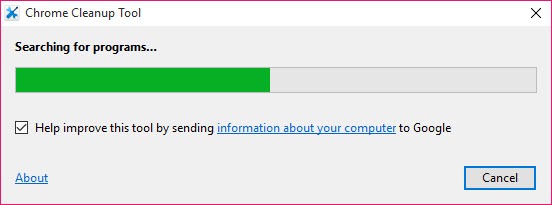
- Easy to Use: The tool is easy to use, with a simple and intuitive interface that makes it easy to scan and remove unwanted programs. This feature is useful for users who are not tech-savvy.
- Regular Updates: Chrome Cleanup Tool is regularly updated to stay ahead of emerging threats, ensuring that you have the latest protection against malware and other types of unwanted software. This feature is essential for staying ahead of new threats.
- Compatibility: The tool is compatible with a wide range of operating systems, including Windows and macOS. This feature makes it a versatile solution for users with different operating systems.
- Google Chrome Integration: Chrome Cleanup Tool is designed to work seamlessly with the Google Chrome browser, making it a great solution for users who want to keep their browser clean and secure. This feature is useful for users who want a integrated solution.
- Threat Protection: The tool provides comprehensive threat protection, including protection against malware, viruses, and other types of unwanted software. This feature is essential for protecting your personal data and device.
- Customizable Scanning: Chrome Cleanup Tool allows you to customize your scans, including the ability to scan specific files and folders. This feature is useful for users who want more control over the scanning process.
Who Should Use Chrome Cleanup Tool?
Chrome Cleanup Tool is designed for anyone who uses the Google Chrome browser and wants to keep their browser clean and secure. The tool is particularly useful for users who have noticed that their browser is running slowly or has been compromised by malware. Chrome Cleanup Tool is also a great solution for users who want to remove unwanted programs that may be putting their personal data at risk.
Beginners and professionals alike can use Chrome Cleanup Tool, as it is easy to use and requires no technical expertise. The tool is also a great solution for businesses that want to protect their employees' browsers from malware and other types of unwanted software. Chrome Cleanup Tool is a versatile solution that can be used in a variety of settings.
Chrome Cleanup Tool: Pros and Cons
Advantages:
- Free to use, with no hidden costs or subscription fees
- Easy to use, with a simple and intuitive interface
- Comprehensive threat protection, including protection against malware and viruses
- Regular updates to stay ahead of emerging threats
- Compatible with a wide range of operating systems, including Windows and macOS
- Designed to work seamlessly with the Google Chrome browser
Disadvantages:
- May not detect all types of malware or unwanted software
- May require additional tools or software to completely remove some types of malware
- May not be as effective as other antivirus solutions on the market
Is Chrome Cleanup Tool Free?
Yes, Chrome Cleanup Tool is completely free to use, with no hidden costs or subscription fees. The tool is provided by Google as a free utility to help users remove unwanted software and keep their browsers clean and secure. There are no paid tiers or upgrades available, making it a great solution for users who want to keep their browser clean and secure without spending money.
Frequently Asked Questions about Chrome Cleanup Tool
Yes, Chrome Cleanup Tool is safe to use, as it is developed by Google and is designed to remove unwanted software and malware from your computer. The tool is regularly updated to stay ahead of emerging threats, ensuring that you have the latest protection against malware and other types of unwanted software.
Chrome Cleanup Tool scans your computer for malware and other types of unwanted software, providing a comprehensive report of any threats found. The tool then provides an easy way to remove these threats, restoring your browser to its optimal state.
Yes, Chrome Cleanup Tool is completely free to use, with no hidden costs or subscription fees. The tool is provided by Google as a free utility to help users remove unwanted software and keep their browsers clean and secure.
To use Chrome Cleanup Tool, simply download and install the tool, then follow the prompts to scan your computer for malware and other types of unwanted software. The tool will then provide an easy way to remove any threats found, restoring your browser to its optimal state.
Chrome Cleanup Tool and Malwarebytes are both antivirus solutions, but they have some key differences. Chrome Cleanup Tool is designed specifically for the Google Chrome browser, while Malwarebytes is a more comprehensive antivirus solution that protects against a wider range of threats. Chrome Cleanup Tool is also free to use, while Malwarebytes offers both free and paid tiers.
Overall, Chrome Cleanup Tool is a reliable and effective solution for removing unwanted software and malware from your computer. With its easy-to-use interface and comprehensive threat protection, it is a great tool for anyone who wants to keep their browser clean and secure. We highly recommend downloading Chrome Cleanup Tool to protect your browser and personal data from emerging threats.
Screenshots
Specifications
User Reviews
No reviews yet. Be the first to review!