
About RKill
RKill is a free antispyware tool designed to terminate malicious processes and programs that may be running on your computer, providing a primary use case of threat protection and a top benefit of real-time malware removal. It is particularly useful for removing malware that prevents the installation or running of antivirus software. By using RKill, users can quickly and effectively stop malicious activities and restore their system's security.
What is RKill?
RKill is a utility developed by BleepingComputer, a reputable company in the cybersecurity industry, with the primary goal of helping users remove malware and other malicious software from their computers. RKill works by terminating any processes that may be linked to malware, allowing users to then run antivirus software to complete the removal process. RKill has gained a reputation as a reliable and effective tool in the fight against malware and spyware.
The history of RKill dates back to its initial release, with the software undergoing numerous updates to improve its effectiveness and compatibility with various operating systems. Throughout its development, RKill has remained committed to providing users with a free and efficient solution to malware removal. RKill's ability to stop malicious processes makes it an essential tool for both beginners and experienced users alike.
RKill's effectiveness in removing malware has made it a popular choice among users looking for a reliable and free antispyware solution. The software's ability to work in conjunction with other antivirus programs makes it a valuable addition to any cybersecurity toolkit. With its long history and proven track record, RKill has become a trusted name in the cybersecurity community.
RKill Key Features
- Malware Termination: RKill's primary feature is its ability to terminate malicious processes, allowing users to regain control of their system and remove malware. This feature is essential for users who have been infected with malware that prevents them from running antivirus software.
- Real-time Protection: RKill provides real-time protection by constantly scanning for and terminating malicious processes, ensuring that users' systems remain secure. This feature is crucial in preventing malware from causing further damage to the system.
- Compatibility: RKill is compatible with a wide range of operating systems, making it a versatile tool for users with different system requirements. This feature ensures that users can use RKill regardless of their operating system.
- Free to Use: RKill is completely free to use, with no hidden costs or subscription fees, making it an attractive option for users on a budget. This feature makes RKill an excellent choice for users who want a reliable antispyware solution without breaking the bank.
- Easy to Use: RKill has a simple and intuitive interface, making it easy for users of all skill levels to navigate and use the software. This feature is essential for beginners who may not be familiar with antispyware software.
- Regular Updates: RKill is regularly updated to ensure that it remains effective against the latest malware threats, providing users with peace of mind. This feature ensures that RKill stays ahead of emerging threats and continues to provide reliable protection.
- Portability: RKill is a portable application, allowing users to run it from a USB drive or other external device, making it a convenient option for users who need to use it on multiple systems. This feature is useful for users who need to use RKill on different computers.
- Antispyware Capabilities: RKill has advanced antispyware capabilities, allowing it to detect and remove a wide range of spyware and malware threats. This feature is essential for users who want to protect their systems from spyware and other malicious software.
- Threat Protection: RKill provides comprehensive threat protection, including protection against trojans, worms, and other types of malware. This feature ensures that users' systems are protected from a wide range of threats.
- System Restoration: RKill can help restore system files and settings that may have been altered by malware, returning the system to a healthy state. This feature is crucial for users who have been infected with malware that has caused system damage.
- Technical Support: RKill offers technical support through its developer, BleepingComputer, providing users with assistance and guidance when needed. This feature is essential for users who may need help using RKill or resolving issues.
Who Should Use RKill?
RKill is suitable for users of all skill levels, from beginners to experienced professionals, as it is easy to use and provides effective malware removal. The software is particularly useful for users who have been infected with malware that prevents them from running antivirus software. RKill is also a valuable tool for businesses and organizations that need to protect their systems from malware and other security threats.
Users who are looking for a free and reliable antispyware solution will find RKill to be an excellent choice. The software's ability to work in conjunction with other antivirus programs makes it a valuable addition to any cybersecurity toolkit. RKill is also a good option for users who want to add an extra layer of protection to their system, providing real-time protection against malware and other threats.
RKill: Pros and Cons
Advantages:
- RKill is free to use, with no hidden costs or subscription fees.
- The software is easy to use, with a simple and intuitive interface.
- RKill provides real-time protection, constantly scanning for and terminating malicious processes.
- The software is compatible with a wide range of operating systems, making it a versatile tool.
- RKill has advanced antispyware capabilities, allowing it to detect and remove a wide range of spyware and malware threats.
- RKill is regularly updated to ensure that it remains effective against the latest malware threats.
Disadvantages:
- RKill may not be able to remove all types of malware, and users may need to use additional software to complete the removal process.
- The software may require users to restart their system after use, which can be inconvenient.
- RKill may not provide comprehensive threat protection, and users may need to use additional software to protect against other types of threats.
Is RKill Free?
RKill is completely free to use, with no hidden costs or subscription fees. The software is available for download from the BleepingComputer website, and users can use it without worrying about incurring any costs. RKill is a free alternative to paid antispyware software, making it an attractive option for users on a budget.
Frequently Asked Questions about RKill
RKill is safe to use, as it is a reputable and well-established antispyware tool developed by BleepingComputer. The software is designed to terminate malicious processes and remove malware, and it does not contain any malware or other security threats.
RKill is designed to terminate malicious processes and remove malware from users' systems. The software works by scanning for and terminating any processes that may be linked to malware, allowing users to then run antivirus software to complete the removal process.
Yes, RKill is completely free to use, with no hidden costs or subscription fees. The software is available for download from the BleepingComputer website, and users can use it without worrying about incurring any costs.
Using RKill is simple: just download and run the software, and it will automatically scan for and terminate any malicious processes on your system. After use, users may need to restart their system and then run antivirus software to complete the removal process.
RKill and Malwarebytes are both antispyware tools, but they have different approaches to malware removal. RKill is designed to terminate malicious processes, while Malwarebytes is a comprehensive antivirus solution that provides real-time protection and removes malware. Both tools can be used together to provide comprehensive threat protection.
RKill is a valuable tool for anyone looking to protect their system from malware and other security threats. With its ease of use, real-time protection, and free availability, RKill is an excellent choice for users of all skill levels. We highly recommend downloading RKill and adding it to your cybersecurity toolkit to provide an extra layer of protection against malware and other threats.
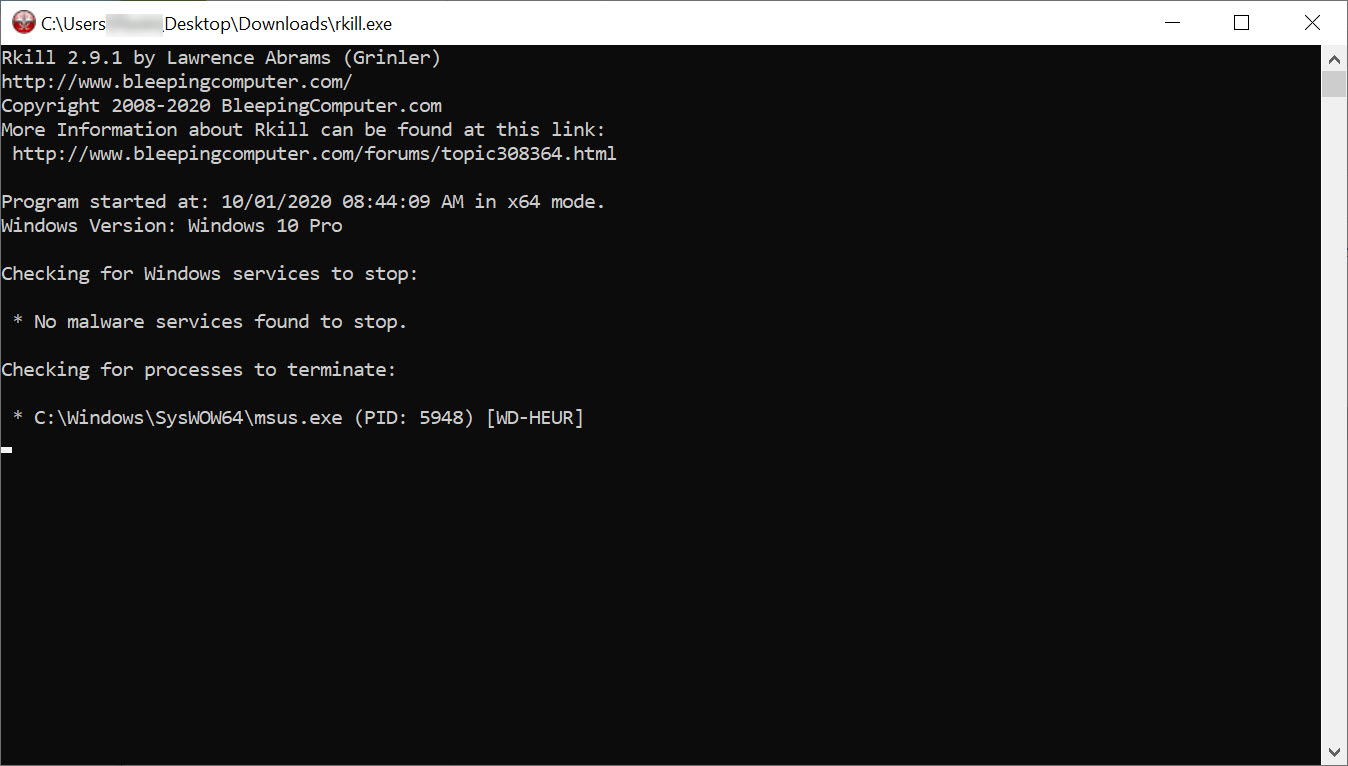
Screenshots
Specifications
User Reviews
No reviews yet. Be the first to review!