
About Shortcut Virus Remover
Shortcut Virus Remover is a free antispyware tool designed to protect computers from malware and other online threats, with its primary use case being the removal of shortcut viruses that can compromise system files and data. The top benefit of using Shortcut Virus Remover is its ability to scan and remove malicious files, providing real-time threat protection and ensuring the security of user data. By using Shortcut Virus Remover, users can safeguard their systems against various types of malware and viruses.
What is Shortcut Virus Remover?
Shortcut Virus Remover is an antispyware software developed by Khalid Kareem, aiming to solve the problem of shortcut viruses that can harm computer systems and steal sensitive information. The software has gained reputation for its effectiveness in removing malicious files and protecting user data. Shortcut Virus Remover has been updated to version 1.1, which includes improved features and enhanced threat detection capabilities.
The primary function of Shortcut Virus Remover is to scan the system for malicious files and remove them, thereby preventing any potential harm to the computer. This is particularly useful for users who frequently download files from the internet or use external devices, as these can be common sources of malware and viruses. Shortcut Virus Remover provides an additional layer of protection against these threats.
Shortcut Virus Remover is a valuable tool for anyone looking to protect their computer from various types of malware and viruses. Its ease of use and effectiveness make it a popular choice among users. The software's ability to detect and remove shortcut viruses, as well as other types of malware, makes it an essential component of any computer security system.
Shortcut Virus Remover Key Features
- Real-Time Scanning: Shortcut Virus Remover provides real-time scanning capabilities, allowing it to detect and remove malicious files as soon as they are introduced to the system. This feature is essential for ensuring the continuous protection of user data.
- Malware Detection: The software includes advanced malware detection capabilities, enabling it to identify and remove various types of malware, including shortcut viruses, trojans, and spyware. This feature helps to safeguard the system against different types of online threats.
- Automatic Updates: Shortcut Virus Remover receives automatic updates, ensuring that its threat detection capabilities are always up-to-date and effective against the latest malware and viruses. This feature provides users with the latest protection against emerging threats.
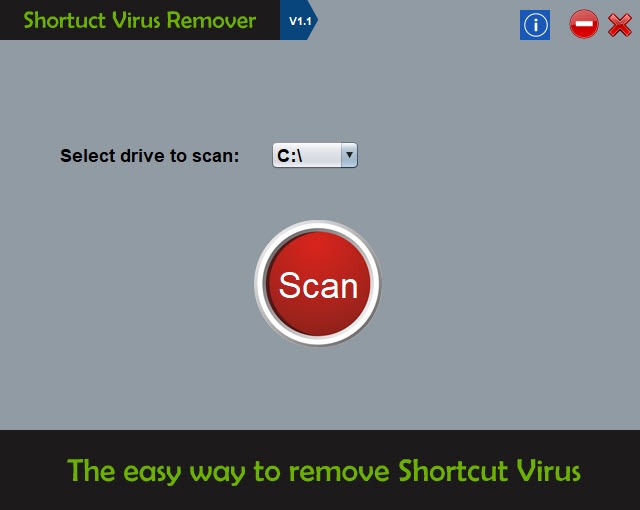
- User-Friendly Interface: The software features a user-friendly interface, making it easy for users to navigate and use, even for those with limited technical expertise. This feature allows users to quickly and easily scan their systems for malware and viruses.
- Free to Use: Shortcut Virus Remover is free to use, making it an accessible option for users who want to protect their computers from malware and viruses without incurring significant costs. This feature is particularly beneficial for individuals and small businesses with limited budgets.
- Compatibility: The software is compatible with various operating systems, including Windows, making it a versatile option for users with different system requirements. This feature allows users to use Shortcut Virus Remover regardless of their operating system.
- Customizable Scans: Shortcut Virus Remover allows users to customize their scans, enabling them to choose which areas of the system to scan and when. This feature provides users with flexibility and control over the scanning process.
- Quarantine Feature: The software includes a quarantine feature, which allows users to isolate and remove detected malware and viruses. This feature helps to prevent the spread of malware and viruses within the system.
- Support: Shortcut Virus Remover provides support for users, including online resources and FAQs, to help them troubleshoot and resolve any issues they may encounter. This feature ensures that users can get the help they need when using the software.
- Lightweight: The software is lightweight, meaning it does not consume significant system resources, allowing users to run it in the background while performing other tasks. This feature makes it ideal for users who want to protect their systems without compromising performance.
- Regular Scans: Shortcut Virus Remover allows users to schedule regular scans, ensuring that their systems are continuously protected against malware and viruses. This feature helps to maintain the security and integrity of user data.
Who Should Use Shortcut Virus Remover?
Shortcut Virus Remover is suitable for anyone who wants to protect their computer from malware and viruses, including home users, businesses, and organizations. The software is particularly useful for users who frequently download files from the internet, use external devices, or access public networks, as these can be common sources of malware and viruses.
The software is easy to use, making it accessible to users with limited technical expertise. Shortcut Virus Remover is also a valuable tool for professionals who want to add an extra layer of protection to their systems, as it can detect and remove various types of malware and viruses. Its ease of use and effectiveness make it a popular choice among users.
Shortcut Virus Remover: Pros and Cons
Advantages:
- Effective in removing shortcut viruses and other malware
- Real-time scanning and threat detection capabilities
- Free to use, making it an accessible option for users
- Easy to use, with a user-friendly interface
- Compatible with various operating systems
- Regular updates to ensure the latest protection against emerging threats
Disadvantages:
- May not detect all types of malware and viruses
- Limited customer support options
- May conflict with other antivirus software
Is Shortcut Virus Remover Free?
Yes, Shortcut Virus Remover is free to use, with no costs or fees associated with downloading and using the software. This makes it an attractive option for users who want to protect their computers from malware and viruses without incurring significant expenses.
Frequently Asked Questions about Shortcut Virus Remover
Yes, Shortcut Virus Remover is safe to use, as it is designed to detect and remove malware and viruses without causing harm to the system or user data. The software has been developed with user safety in mind and is regularly updated to ensure the latest protection against emerging threats.
Shortcut Virus Remover is designed to detect and remove shortcut viruses and other malware from computer systems, providing real-time threat protection and ensuring the security of user data. The software scans the system for malicious files and removes them, preventing any potential harm to the computer.
Yes, Shortcut Virus Remover is free to use, with no costs or fees associated with downloading and using the software. This makes it an accessible option for users who want to protect their computers from malware and viruses without incurring significant expenses.
To use Shortcut Virus Remover, simply download and install the software, then launch it and follow the prompts to scan your system for malware and viruses. The software is easy to use, with a user-friendly interface that guides users through the scanning and removal process.
While both Shortcut Virus Remover and Avast are designed to detect and remove malware and viruses, Shortcut Virus Remover is specifically focused on removing shortcut viruses and other types of malware, making it a valuable tool for users who want to add an extra layer of protection to their systems. Avast, on the other hand, is a more comprehensive antivirus solution that provides a wider range of features and protection.
Overall, Shortcut Virus Remover is a valuable tool for anyone looking to protect their computer from malware and viruses. Its effectiveness in removing shortcut viruses and other malware, combined with its ease of use and free availability, make it a popular choice among users. We recommend downloading Shortcut Virus Remover to add an extra layer of protection to your system and ensure the security of your data.
Screenshots
Specifications
User Reviews
No reviews yet. Be the first to review!