
About K-Lite Codec Pack Full
K-Lite Codec Pack Full is a comprehensive collection of codecs and related tools that enable users to play various audio and video formats on their computers. The primary use case for K-Lite Codec Pack Full is to provide a seamless multimedia experience by allowing users to play files without the need for additional software or codecs. By using K-Lite Codec Pack Full, users can enjoy their favorite movies and music without worrying about compatibility issues.
What is K-Lite Codec Pack Full?
K-Lite Codec Pack Full is developed by Codec Guide, a reputable company in the field of multimedia software. K-Lite Codec Pack Full solves the problem of incompatible media formats by providing a wide range of codecs that can handle various file types. With a long history of development, K-Lite Codec Pack Full has established itself as a reliable and efficient solution for media playback.
K-Lite Codec Pack Full is designed to be user-friendly, making it easy for anyone to install and use. The software is constantly updated to ensure that it remains compatible with the latest media formats and technologies. K-Lite Codec Pack Full has become a popular choice among users who want to enjoy their multimedia content without any hassle.
The latest version of K-Lite Codec Pack Full, 19.7.0, continues to build on the software's reputation for excellence. With its comprehensive set of codecs and tools, K-Lite Codec Pack Full provides a complete solution for media playback. Whether you're a casual user or a professional, K-Lite Codec Pack Full is an essential tool for anyone who wants to enjoy their multimedia content.
By using K-Lite Codec Pack Full, users can ensure that they have the latest codecs and technologies, allowing them to play a wide range of media formats. K-Lite Codec Pack Full is a must-have for anyone who wants to enjoy their favorite movies, music, and other multimedia content without any compatibility issues.
K-Lite Codec Pack Full Key Features
- Comprehensive Codec Collection: K-Lite Codec Pack Full includes a wide range of codecs that can handle various media formats, ensuring that users can play their favorite files without any issues. This feature is essential for users who want to enjoy their multimedia content without worrying about compatibility problems.
- Media Player Classic: K-Lite Codec Pack Full includes Media Player Classic, a popular media player that provides a simple and intuitive interface for playing media files. This feature allows users to easily play their favorite files without having to configure any settings.
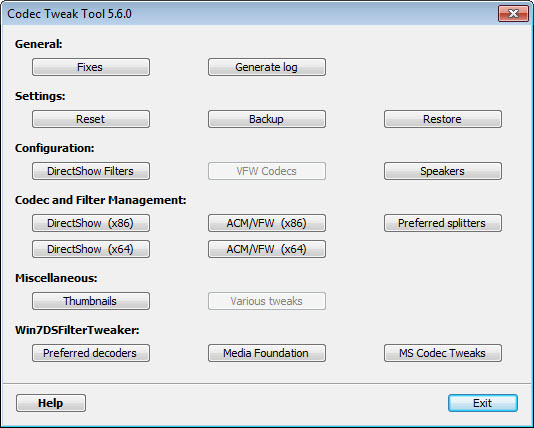
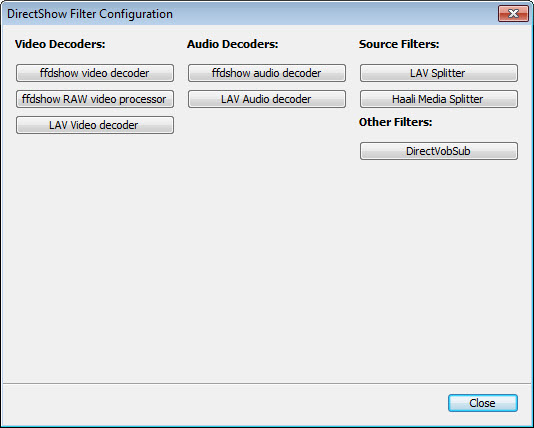
- Codec Configuration Tool: K-Lite Codec Pack Full includes a codec configuration tool that allows users to customize their codec settings and optimize their media playback experience. This feature is useful for advanced users who want to fine-tune their settings for optimal performance.
- Update Notification: K-Lite Codec Pack Full includes an update notification feature that alerts users when new updates are available, ensuring that they have the latest codecs and technologies. This feature is essential for users who want to stay up-to-date with the latest developments in media playback.
- 64-Bit Support: K-Lite Codec Pack Full supports 64-bit operating systems, providing a seamless media playback experience for users with 64-bit systems. This feature is essential for users who want to take full advantage of their system's capabilities.
- Multi-Language Support: K-Lite Codec Pack Full supports multiple languages, making it accessible to users from around the world. This feature is useful for users who prefer to use their native language when interacting with the software.
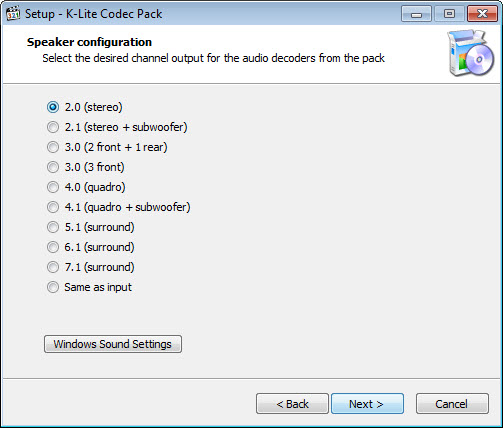
- Customizable Installation: K-Lite Codec Pack Full allows users to customize their installation, choosing which components to install and which to skip. This feature is useful for advanced users who want to tailor their installation to their specific needs.
- Compact Size: K-Lite Codec Pack Full has a compact size, making it easy to download and install on users' computers. This feature is essential for users who have limited bandwidth or storage space.
- Free Support: K-Lite Codec Pack Full offers free support, providing users with assistance and guidance when they need it. This feature is useful for users who are new to media playback or need help with troubleshooting.
- Regular Updates: K-Lite Codec Pack Full receives regular updates, ensuring that users have the latest codecs and technologies. This feature is essential for users who want to stay up-to-date with the latest developments in media playback.
- Compatibility: K-Lite Codec Pack Full is compatible with a wide range of media formats, including AVI, MP4, and MKV. This feature is essential for users who want to play a variety of media files without any issues.
Who Should Use K-Lite Codec Pack Full?
K-Lite Codec Pack Full is suitable for anyone who wants to enjoy their multimedia content without any compatibility issues. Whether you're a casual user or a professional, K-Lite Codec Pack Full provides a comprehensive solution for media playback. Beginners can easily install and use the software, while advanced users can customize their settings and optimize their media playback experience.
K-Lite Codec Pack Full is particularly useful for users who work with multimedia content, such as video editors, graphic designers, and musicians. The software provides a wide range of codecs and tools that can handle various media formats, making it an essential tool for anyone who works with multimedia content.
Businesses can also benefit from using K-Lite Codec Pack Full, as it provides a cost-effective solution for media playback. The software is free to use, and it can be easily deployed on multiple computers, making it an ideal solution for companies that need to play multimedia content on a large scale.
K-Lite Codec Pack Full: Pros and Cons
Advantages:
- K-Lite Codec Pack Full provides a comprehensive set of codecs and tools for media playback.
- The software is easy to install and use, making it accessible to users of all skill levels.
- K-Lite Codec Pack Full is free to use, making it a cost-effective solution for media playback.
- The software receives regular updates, ensuring that users have the latest codecs and technologies.
- K-Lite Codec Pack Full is compatible with a wide range of media formats, including AVI, MP4, and MKV.
- K-Lite Codec Pack Full includes a customizable installation, allowing users to choose which components to install and which to skip.
Disadvantages:
- K-Lite Codec Pack Full may not be compatible with all media formats, although it supports a wide range of files.
- The software may require additional configuration for optimal performance, although this is not typically necessary.
- K-Lite Codec Pack Full may not be suitable for users who require advanced features, such as video editing or encoding.
Is K-Lite Codec Pack Full Free?
K-Lite Codec Pack Full is completely free to use, with no costs or subscriptions required. The software is developed and maintained by Codec Guide, which provides the software as a free download. There are no paid tiers or upgrades required to use the full features of K-Lite Codec Pack Full.
As a free software, K-Lite Codec Pack Full provides an excellent value for users who want to enjoy their multimedia content without any compatibility issues. The software is regularly updated, ensuring that users have the latest codecs and technologies, and it is compatible with a wide range of media formats.
Frequently Asked Questions about K-Lite Codec Pack Full
Yes, K-Lite Codec Pack Full is safe to use, as it is developed and maintained by a reputable company and is free from malware and viruses. The software is also regularly updated to ensure that it remains secure and stable.
K-Lite Codec Pack Full provides a comprehensive set of codecs and tools for media playback, allowing users to play a wide range of media formats without any compatibility issues. The software includes a range of features, such as Media Player Classic and a codec configuration tool.
Yes, K-Lite Codec Pack Full is completely free to use, with no costs or subscriptions required. The software is developed and maintained by Codec Guide, which provides the software as a free download.
Using K-Lite Codec Pack Full is easy, as the software is designed to be user-friendly. Simply download and install the software, and then use Media Player Classic or your preferred media player to play your multimedia content. The software includes a range of features and tools that can be customized to optimize your media playback experience.
K-Lite Codec Pack Full and VLC Media Player are both popular media playback solutions, but they have some key differences. K-Lite Codec Pack Full provides a comprehensive set of codecs and tools, while VLC Media Player is a more basic media player that can play a wide range of media formats. K-Lite Codec Pack Full is a better choice for users who require advanced features and customization options.
K-Lite Codec Pack Full is a must-have for anyone who wants to enjoy their multimedia content without any compatibility issues. With its comprehensive set of codecs and tools, the software provides a complete solution for media playback. Whether you're a casual user or a professional, K-Lite Codec Pack Full is an essential tool for anyone who wants to play a wide range of media formats without any issues. We highly recommend downloading K-Lite Codec Pack Full to experience the ultimate in media playback.
Screenshots
Specifications
User Reviews
No reviews yet. Be the first to review!